


A 7-step playbook for taking an enterprise AI copilot from boardroom mandate to production — with the architecture, governance patterns, and ROI math that separate the 31% of enterprises with copilots in production from the 95% whose pilots delivered zero P&L impact.
Exclusive Summary (TL;DR)
Building an enterprise AI copilot in 2026 means executing seven sequential steps:
- Select a high-value, measurable workflow
- Audit and prepare your knowledge base
- Design a multi-model foundation strategy
- Engineer a RAG-grounded retrieval layer
- Add agentic tool-calling and orchestration
- Implement governance, security, and evaluation harnesses
- Measure ROI by active-user impact, not seat count.
Median payback for production deployments is 5.1 months, and McKinsey reports an average 5.8x ROI within 14 months — but only for organizations that redesigned the underlying workflow before selecting models.
Why This Guide Exists
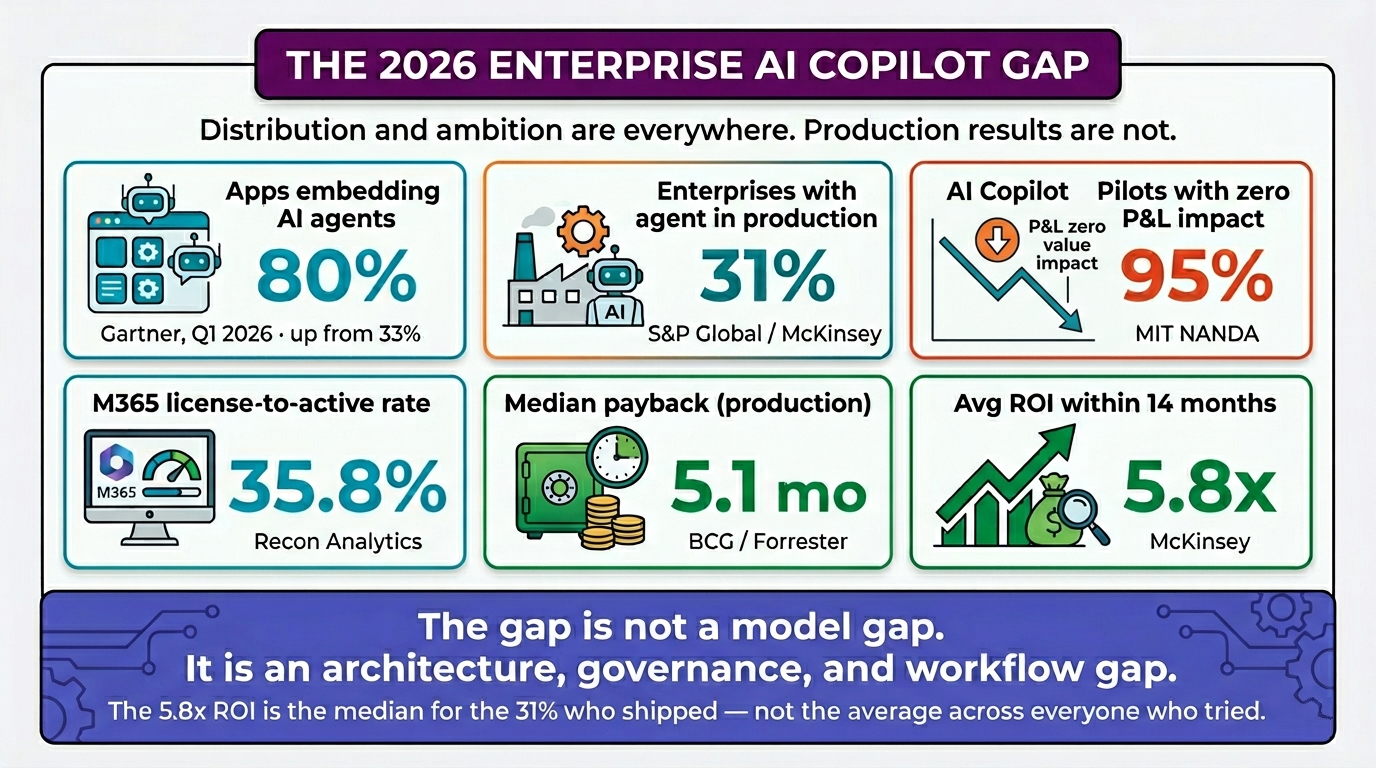
In Q1 2026, 80% of enterprise applications shipped with at least one embedded AI agent, according to Gartner. And yet only 31% of enterprises have a single agent in production. The MIT NANDA report found that 95% of enterprise AI pilots delivered zero measurable P&L impact, despite dramatic improvements in model capability over the past 18 months.
The gap is not a model gap. It is an architecture, governance, and workflow gap.
This guide is the playbook we wish we’d had when we started building enterprise copilots four years ago. It assumes you already understand what an LLM does. It does not assume your data is ready, your stakeholders are aligned, or your governance is in place — because in our experience, those are the three places almost every enterprise project fails.
If you’re planning to build a production-ready enterprise copilot, explore our AI Copilot development services.
What Counts as an “Enterprise AI Copilot” in 2026
The term has stretched to meaninglessness, so let’s anchor it.
An enterprise AI copilot is a production-grade AI system embedded inside enterprise workflows that:
- Understands natural language input from internal users (employees, occasionally customers).
- Retrieves grounded information from your enterprise data — not just model weights — through retrieval-augmented generation (RAG) or agentic retrieval.
- Reasons over multi-step tasks using one or more foundation models.
- Takes actions through tool-calling against internal APIs, with permission scoping and human-in-the-loop checkpoints.
- Operates within governance boundaries defined by IT, security, legal, and compliance — including audit trails, permission scopes, and approval workflows.
- Produces measurable business outcomes that map to a P&L line.
This is fundamentally different from a chatbot. A chatbot answers from training data. A copilot grounds answers in your data and can act.
It’s also different from Microsoft 365 Copilot or Google Workspace’s Gemini, which are productivity overlays. Those are valuable, but they are not enterprise copilots in the strategic sense — they are commodity assistants. The defensible enterprise copilot is the one tied to your domain, your data, and your workflows.
For a precise distinction, see our companion piece on AI copilot vs AI agent vs chatbot.
The Strategic Decision That Comes Before Step 1
Before you write a line of code or sign a single SOW, answer this:
“What workflow, if 60% automated, would change a P&L line by more than the cost of the copilot?”
This is the only screening question that matters. If you cannot answer it specifically — naming the workflow, the metric, the dollar value, and the cost ceiling — you are not ready to build. You are ready to discover.
McKinsey’s 2025 research found that organizations capturing real ROI from AI were twice as likely to redesign end-to-end workflows before selecting models. Johnson & Johnson ran 900+ generative AI projects and discovered that 10–15% of them delivered 80% of the value. They consolidated around their Rep Copilot for sales reps and a handful of drug-discovery applications. The lesson: be ruthlessly selective about the first workflow.
Good first workflows share five characteristics: (a) high frequency, (b) measurable outcomes, (c) accessible structured + unstructured data, (d) low blast radius if the system is wrong, and (e) a clear human owner. Examples include Tier-1 IT support deflection, sales pipeline triage, HR policy Q&A, invoice-line variance analysis, and contract-clause extraction.
Bad first workflows: anything customer-facing, anything in legal/compliance with regulatory exposure, anything where the dataset is buried in tribal knowledge, and anything where success is “qualitative.”
Eliminate Manual Work. Deploy Your AI Copilot Faster.
Step 1 — Define the Workflow with Surgical Precision
Once you’ve selected the workflow, document it at three levels.
Level 1: The plain-English description.
“When a sales rep needs to respond to an inbound RFP, they currently spend 4–6 hours pulling content from past proposals, the product wiki, and Salesforce. They send the draft to product marketing for review, which takes another 2 days. The copilot will reduce the rep’s drafting time to 30 minutes and product marketing’s review time to 4 hours.”
Level 2: The structured task graph.
Decompose the workflow into discrete steps: receive RFP → classify by industry/product → retrieve relevant past proposals → retrieve product specs → assemble draft → flag clauses needing legal review → notify product marketing → log to Salesforce. Each step is a candidate for either AI execution, human execution, or a tool call.
Level 3: The success metrics, baseline, and target.
- Baseline: 4.5 hours/RFP drafting, 2 days/RFP review, 31% RFP win rate
- Target: 30 min/RFP drafting, 4 hours/RFP review, 35% RFP win rate
- Cost ceiling: $X/year all-in (license + infrastructure + maintenance)
- Active-user target: 70%+ of sales reps using ≥3x/week within 90 days
Without all three levels, you are signing up for a vanity project.
Step 2 — Audit and Prepare the Knowledge Base
This is the step every enterprise underestimates. Your copilot’s quality ceiling is your data’s quality. RAG amplifies whatever it retrieves — including errors, contradictions, and outdated content.
A documentation audit answers four questions:
Is it complete?
Does the documentation cover the topics the copilot will be asked about? Run a “shadow log” exercise — collect 200 real questions from the workflow over two weeks — and check whether each has an authoritative document.
Is it current?
Set a freshness threshold (e.g., 18 months) and tag every document. Older documents either get refreshed, archived, or explicitly excluded from the index.
Is it consistent?
Find and resolve contradictions. If three different policy documents define “remote work eligibility” differently, the copilot will hallucinate by averaging them.
Is it structured for retrieval?
Long PDFs with no headings retrieve poorly. Documents need section structure, metadata (author, date, owner, classification), and ideally markdown or HTML conversion for cleaner chunking.
In our engagements, this phase typically takes 3–8 weeks for mid-sized enterprises and is the single highest-leverage investment you can make. Skipping it is the fastest way to build a copilot that frustrates users.
After cleanup, plan your chunking strategy (typically 300–800 tokens with 10–15% overlap, semantic chunking where possible), embedding model (OpenAI’s text-embedding-3-large, Cohere Embed v3, or a self-hosted alternative if data residency demands it), and vector database (see our comparison piece on Pinecone vs Weaviate vs pgvector vs Azure AI Search for the trade-offs — broadly: pgvector for sub-10M vectors and Postgres-native shops, Pinecone for managed scale, Azure AI Search for Microsoft-native enterprises with Graph integration needs).
Step 3 — Design Your Multi-Model Foundation Strategy
In April 2026, Microsoft made a quiet but seismic change: its Researcher agent inside Microsoft 365 Copilot now drafts responses using OpenAI’s GPT, then has Anthropic’s Claude review them for accuracy, completeness, and citation quality before finalizing. Microsoft’s corporate VP for design and research framed it directly: two models are better than one. Microsoft has signaled it intends to move away from promoting specific model names entirely — workers will declare what they’re trying to accomplish, and the system will route to the right model.
This is the end of the single-model era in enterprise AI. For your copilot, plan accordingly.
A modern enterprise copilot foundation strategy has four components:
A primary reasoning model.
The workhorse. Today this is typically Claude Sonnet 4.7 / Opus 4.7, GPT-5 class, or Gemini 2.5 Pro class. Choose based on benchmarks for your specific task (long-context reasoning, code, structured extraction, creative writing).
A verifier or critique model.
A second model used to fact-check, audit, or critique the primary model’s output. This is the “Critique & Council” pattern Microsoft has productized. It catches errors that one model alone would miss and is the most reliable hallucination defense in production.
Specialized models.
Embedding models (separate from chat), classifier models for routing/PII detection, smaller fast models for simple tasks (cost optimization), vision models for document understanding.
A routing layer.
Logic that decides which model handles which sub-task. Cheap models for simple intents, expensive models for complex reasoning, fastest models for latency-sensitive paths.
The build vs buy question lives here too. Build if you have a specialized domain where commercial models underperform (rare). Buy (use API models) if your moat is data and workflow, not the model itself (the common case). Extend (Copilot Studio, Salesforce Einstein, ServiceNow Now Assist) if your workflow is fully inside one ecosystem and you can tolerate the lock-in.
Hybrid approaches are now the norm. The most common 2026 stack: API-based foundation models for the heavy reasoning, self-hosted or fine-tuned smaller models for high-volume narrow tasks, and a routing layer in between.
Step 4 — Engineer the Retrieval Layer
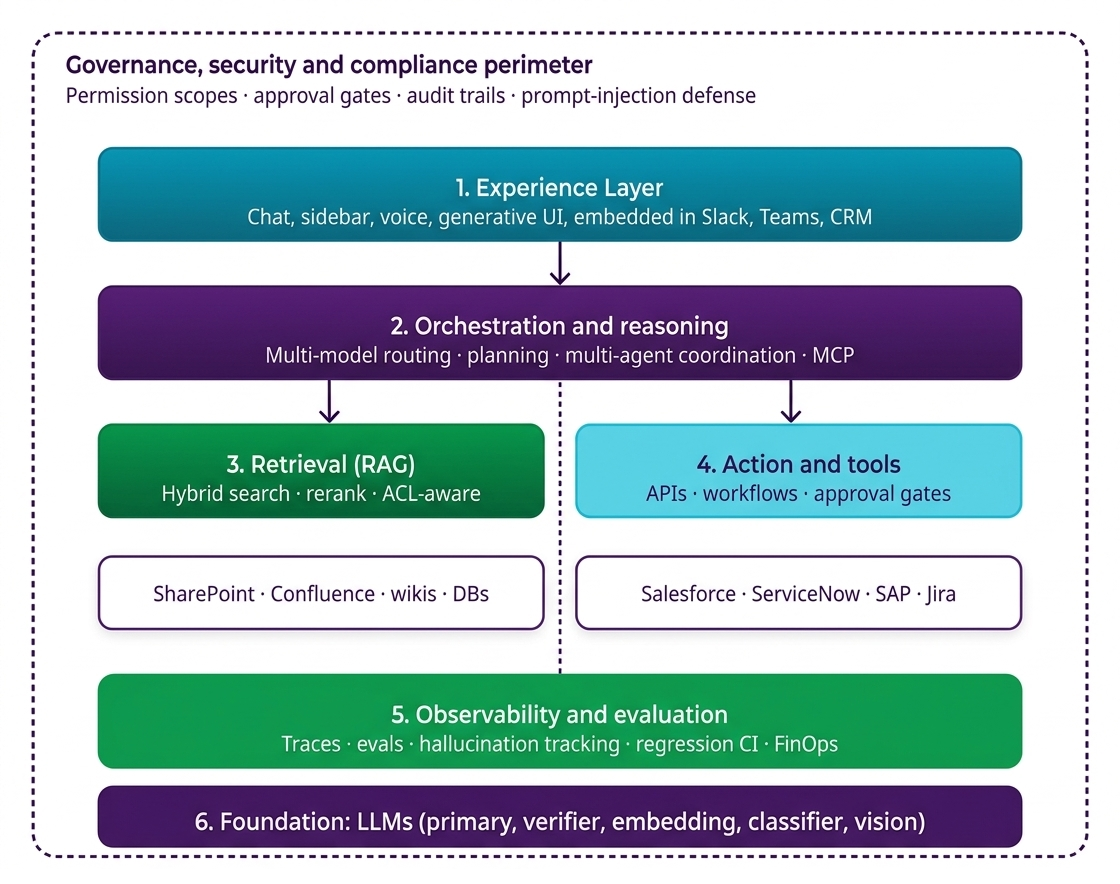
RAG is the architectural pattern that separates copilots from chatbots. The basic shape is well understood: chunk your documents, embed them as vectors, store the vectors, retrieve relevant chunks at query time, inject them into the model’s context window. But production-grade retrieval is far more nuanced than the basic pattern suggests.
A 2026 production retrieval layer typically includes:
Hybrid search.
Pure vector search alone fails on queries with proper nouns, IDs, dates, or rare terms. Combine vector similarity with BM25/keyword search and rerank.
Query rewriting.
The user’s literal query is often a poor retrieval query. Use a small fast model to rewrite the question into 1–3 retrieval-optimized queries, run all of them, and merge results.
Multi-source retrieval.
Most enterprise copilots need to search across SharePoint, Confluence, Salesforce, Slack archives, ticketing systems, internal wikis, and structured databases. Each source has different access controls, freshness characteristics, and authority weights.
Reranking.
After retrieval, use a cross-encoder reranker (Cohere Rerank, BGE Reranker) to score the top 50–100 candidates and select the top 5–10 to actually inject into context. This is where retrieval precision is won or lost.
Citation tracking.
Every retrieved chunk must carry source metadata (URL, document ID, section, last-modified date) through to the response. If the user can’t see why the copilot said something, they will not trust it. Microsoft Copilot Studio, for example, now automatically adds citations so users can see exactly which documents the answer came from. Match that bar.
Agentic RAG.
For complex queries, a single retrieval pass is insufficient. Agentic RAG lets the model decide what to retrieve, run multiple retrievals iteratively, and reason over the results. This is the dominant pattern for enterprise research and analysis tasks.
A note on access control: retrieval must respect the user’s permissions at query time. If the copilot can find documents the requesting user is not authorized to see, you have a data leak, not a feature. This is non-negotiable, and it’s a reason ACL-aware retrieval (which Azure AI Search and Microsoft Graph handle natively) is the path of least resistance for Microsoft-shop enterprises.
Step 5 — Add Agentic Capabilities (Tool Calling, Multi-Step Planning, Multi-Agent)
Retrieval-only copilots answer questions. Agentic copilots take actions. This is where the value compounds.
The minimum agentic capability is tool calling: the model can choose to invoke a function (e.g., create_jira_ticket, query_salesforce_opportunity, send_slack_message) when appropriate, pass structured arguments, and consume the result. Every major foundation model API supports this natively.
Above tool calling sits multi-step planning: the model decomposes a goal into sub-tasks, executes them in sequence, handles failures, and replans. This is where frameworks like LangGraph, CrewAI, and Microsoft Copilot Studio’s orchestration layer come in.
Above that sits multi-agent orchestration: specialized agents (researcher, writer, reviewer, executor) collaborate on a task. 22% of production deployments now coordinate three or more agents as of Q1 2026 according to digitalapplied.com data, and this is the fastest-growing pattern.
The plumbing for cross-agent and cross-tool communication is standardizing fast. The Model Context Protocol (MCP) has crossed 9,400 public servers as of April 2026 and has become the de facto interface for tool exposure. Agent-to-Agent (A2A) protocols like Google’s AG-UI specification (now at v0.9) are emerging as the equivalent for agent interop. Build with these standards from day one. Proprietary tool layers will become technical debt within 18 months.
For each tool you expose to the copilot, define:
- Permission scope: which users/roles can invoke it
- Input validation: schema-enforced argument checking
- Approval gates: which actions require human approval before execution (the Microsoft Copilot Cowork pattern uses three-tier control: permission scopes, approval workflows, execution logging)
- Audit logging: every invocation timestamped, attributed, and outcome-logged
- Reversibility: for irreversible actions (sending email, deleting records, transferring funds), require explicit user confirmation
This is also where Microsoft’s Agent 365 framework, announced at the 2026 M365 Conference, has set a useful template even if you’re not on Microsoft’s stack. Agent 365 introduces an Agent Registry (single pane of glass for every AI agent in the tenant), Entra-ID-based access control, and standardized audit logging. Whatever your stack, build the equivalent: a single inventory of every agent, every tool, every permission, and every action they’ve taken.
Step 6 — Governance, Security, and Evaluation
This is the layer that separates a demo from production. Every enterprise copilot needs three governance pillars.
Pillar 1: Policy-Based Permission Scopes
Define what your copilot can access and what it can do — at the role, user, and resource level. A marketing team’s copilot might have access to campaign analytics but be blocked from financial systems. An HR agent might process employee data but not engineering repositories. Microsoft formalizes this through the Agent 365 framework; on a custom build, you’ll implement it through your IAM provider (Entra ID, Okta) plus application-level policy checks.
Pillar 2: Approval Workflows
Define which actions can proceed autonomously and which require human approval. Reading data: usually autonomous. Drafting communications: usually autonomous, with the human sending. Executing transactions, sending external emails, modifying production records, accessing classified data: gated. Microsoft’s Copilot Cowork uses checkpoints for this — mandatory human approval at sensitive points in a workflow. Replicate the pattern.
Pillar 3: Audit Trails
Every operation generates a timestamped record: what was done, by which agent, on whose behalf, against which policy, with what outcome. Audit logs must be immutable, searchable, and retained per your regulatory regime. This is the foundation of compliance under the EU AI Act (in force from 2025), HIPAA (US healthcare), GDPR (EU), and SOC 2 / ISO 27001 (generally expected).
Security Layer
Beyond governance, the copilot stack needs defense against:
- Prompt injection — adversarial text embedded in retrieved documents that hijacks the model. Mitigate with strict separation of trusted and untrusted content, system-prompt hardening, and output filtering.
- Data exfiltration — model leaking sensitive data into responses or external tool calls. Mitigate with PII redaction at retrieval time, output classifiers, and tool-allowlist controls.
- Tenant isolation — in multi-tenant deployments, ensure no possibility of cross-tenant data leakage. Single-tenant deployments are the safer default for highly regulated industries.
- Model supply chain — verify provenance of any open-source or fine-tuned models. Treat models like third-party software dependencies with vulnerability scanning.
Evaluation Harness
LangChain’s 2026 survey found that 89% of agent builders had implemented observability, but only 52% had adopted formal evaluations. The 48% gap is where production failures live.
Build evals across four dimensions:
- Retrieval quality — does the retriever return the right chunks? Measure recall@k and precision@k against a golden test set.
- Response quality — is the response factually grounded, complete, and on-policy? Use LLM-as-judge for scale, human review for the test set.
- Action correctness — when the copilot calls tools, are the arguments correct and is the chosen tool appropriate?
- Safety and policy compliance — does the copilot refuse out-of-scope requests, redact PII, and avoid leaking restricted data?
Run evals continuously in CI. Every prompt change, model upgrade, or knowledge base update triggers regression testing. Without this, you are flying blind every time the model vendor releases a new version.
Step 7 — Measure ROI by Active-User Impact
The cardinal mistake in enterprise copilot deployment is treating license count as adoption. Microsoft has 15 million paid M365 Copilot seats but only 33 million active users (across paid and bundled tiers) and a 35.8% workplace conversion rate from license to active user. If the world’s most aggressively distributed enterprise copilot converts only one in three license holders into active users, your custom build needs a much sharper measurement framework.
Track four metrics, in this hierarchy:
Tier 1 — Active usage.
Weekly active users / total provisioned users. Target 60%+ within 90 days, 80%+ within 180 days for any deployment that should be considered successful. Below 50% sustained, the deployment has failed regardless of what individual users say.
Tier 2 — Task outcome.
For each instrumented workflow, measure the actual outcome metric (drafting time, ticket resolution time, deal close rate, etc.) against baseline. This is the real ROI number.
Tier 3 — Quality and trust.
User-reported answer quality (thumbs up/down, periodic surveys), hallucination rate from spot audits, escalation rate (how often users abandon the copilot mid-task).
Tier 4 — Cost.
All-in cost per active user per month, including LLM tokens, infrastructure, licenses, and a fully-loaded share of engineering maintenance. The median enterprise’s monthly LLM bill grew 7.2x year-over-year entering Q1 2026 — FinOps for LLMs is a real discipline now and needs an owner.
The math that matters: at $30/seat/month and a 35% adoption rate, your effective cost per active user is $86/month. To break even at a $75/hour loaded labor rate, each active user needs to save roughly 70 minutes per week — achievable, but only if the copilot is genuinely embedded in their workflow and they use it 4–5 times per week minimum. Telemetry from large deployments suggests 7–10 minutes saved per Copilot interaction is realistic; at five interactions per week, that yields roughly the needed 50 minutes/week of value. The numbers are tight. They get easier when adoption climbs above 60% and when you concentrate on workflows where each interaction saves
30+ minutes (RFP responses, code generation, research synthesis), not 5 (email drafting).
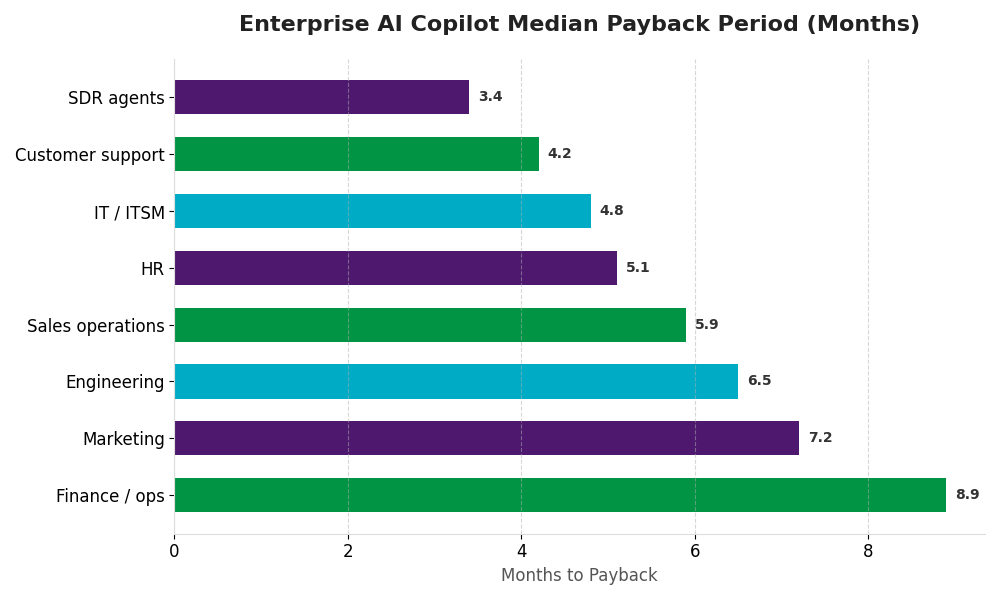
McKinsey reports a 5.8x ROI within 14 months as the average for production deployments. Forrester and BCG put median payback at 5.1 months, with sales-development-rep agents paying back in 3.4 months and finance/ops agents in 8.9 months. These are not aspirational numbers — they’re the median for organizations that ship. The 95% who don’t ship aren’t in the average.
The 90-Day Pilot Structure That Works
For organizations starting their first enterprise copilot, the 90-day pilot is the right scope.
Days 1–30: Foundation.
Workflow selection, data audit, architecture design, governance framework draft, evaluation harness scaffold, foundation model selection. Output: a green-lit design doc with executive sign-off and a defined success criterion.
Days 31–60: Build.
Retrieval layer, agentic orchestration, integration with 2–4 enterprise systems, initial prompt engineering, eval baseline. Output: a working internal alpha used by 5–10 design partners.
Days 61–90: Pilot.
Roll out to 50–200 users in the target workflow. Measure against baseline. Collect feedback. Tune retrieval and prompts. Output: a go / no-go decision with quantified results.
The exit criteria for “go” should be defined on day 1. Typical thresholds: 60%+ weekly active among the pilot cohort, the workflow outcome metric improves by at least 30% against baseline, and incremental cost per active user is below the labor savings.
If you don’t hit those thresholds, “no-go” is a healthy outcome. Gartner predicts 40% of agentic AI projects will be canceled by end of 2027 — and for projects that lacked clear ROI metrics or governance, cancellation is the right answer. Cancellation discipline is what separates mature programs from theatre.
What’s Coming Next: From Copilot to Autonomous Agent
Microsoft’s 2026 M365 conference reframed Copilot from “assistant” to “execution layer.” The progression is unambiguous: from the productivity-assistant Copilot of 2023–2024, to the multi-step autonomous agent of 2025–2026 (Copilot Cowork, Agent 365), to what Microsoft now calls Agent 365 — a framework for governing autonomous AI agents that initiate actions, make decisions, and manage entire processes with minimal human intervention.
Gartner’s projections corroborate the trajectory: by 2028, at least 15% of day-to-day work decisions will be made autonomously through agentic AI, and 33% of enterprise software applications will include agentic AI (up from less than 1% in 2024).
For enterprise architects, this means three things:
Design for autonomy gradients, not binary control. Build approval gates, checkpoints, and policy controls into your architecture from day one. Retrofitting governance onto an autonomous agent later is much harder than building it in.
Standardize on open protocols. MCP for tool exposure, A2A for agent interoperability, OpenTelemetry for observability. Proprietary integrations age into liabilities fast.
Invest in vertical depth, not horizontal breadth. The general-purpose copilot is commoditizing. Defensible enterprise advantage comes from domain-specific evaluation harnesses, fine-tuned vertical models, and proprietary workflow knowledge.
Microsoft’s bet is that enterprise AI adoption depends as much on control as capability. We agree. The companies that compound through the 2026–2027 cycle will not be the ones moving fastest — they will be the ones moving most deliberately, with production-grade governance, scoped pilots, vertical specificity, and human-in-the-loop architecture from day one.
See What an AI Copilot Could Do for Your Business
FAQs about Enterprise AI Copilot?
What is an enterprise AI copilot?
An enterprise AI copilot is a production-grade AI system embedded in enterprise workflows that understands natural language, retrieves grounded information from internal data, reasons over multi-step tasks, and takes actions through tool-calling — within governance boundaries defined by IT, security, and compliance.
How long does it take to build an enterprise AI copilot?
A focused pilot for one workflow typically takes 90 days end-to-end. A production deployment serving 1,000+ users across 2–3 workflows typically takes 6–9 months. Enterprise-wide rollouts take 18–24 months and depend more on change management and data readiness than on engineering.
How much does an enterprise AI copilot cost?
For a custom build serving 1,000 active users, all-in annual cost typically ranges from $400K to $1.5M including LLM tokens, infrastructure, third-party services, and engineering maintenance. Microsoft 365 Copilot at $30/seat/month is $360K/year for 1,000 seats — but the relevant comparison is cost per active user, not seat. With a 35% adoption rate, that’s effectively $86 per active user per month.
Build, buy, or extend?
Build when you have unique data and workflows that no commercial copilot covers (most common in regulated, highly specialized verticals). Buy (API-based with custom orchestration) when your moat is data and workflow, not the model — the most common pattern in 2026. Extend (Copilot Studio, Salesforce Einstein, ServiceNow Now Assist) when your workflow is fully inside one ecosystem and lock-in is acceptable.
What's the difference between an AI copilot and an AI agent?
A copilot assists a human in a workflow — it suggests, drafts, retrieves, and the human decides. An agent executes tasks autonomously within defined boundaries. In 2026, the line is blurring: most enterprise copilots now include agentic capabilities (autonomous tool calling, multi-step execution) inside human-supervised workflows. Microsoft’s Copilot Cowork is the canonical example.
Is my data safe in an enterprise AI copilot?
It can be, with the right architecture. Critical controls: tenant-isolated deployment, encryption in transit and at rest, ACL-aware retrieval (so users only retrieve data they’re already authorized to see), no training on customer data (verify in your contract), audit logging, PII redaction, and prompt-injection defenses. Compliance frameworks to align with: SOC 2, ISO 27001, GDPR, HIPAA (US healthcare), EU AI Act (in force from 2025).
How do you measure AI copilot ROI?
Four-tier hierarchy: (1) active usage rate — target 60%+ within 90 days; (2) task outcome — workflow-specific metric vs. baseline; (3) quality and trust — user feedback, hallucination rate, escalation rate; (4) all-in cost per active user. McKinsey’s average is 5.8x ROI within 14 months for production deployments; BCG/Forrester median payback is 5.1 months.


Unlock Measurable ROI with Your Enterprise AI Copilot
Book a Strategy Call


