


OpenClaw crossed 347,000 GitHub stars in under six months. It is the fastest-growing open-source AI project on record. In February, its creator Peter Steinberger was hired by OpenAI. And between February and April 2026 alone, security researchers logged 138 CVEs against it, including seven rated critical.
Both things are true at the same time.
OpenClaw can read your emails, run commands on your servers, coordinate tasks across Slack and WhatsApp, and act autonomously inside your infrastructure. It can also hand a stranger the keys to all of that if you install it the way most teams do — quickly, with defaults, without a security wrapper around it.
If you are a CTO or head of security evaluating OpenClaw, this is the piece you need before the conversation moves further. Five risks. What they actually mean for your business. And what a defensible deployment actually requires.
TL;DR: The 5 OpenClaw security risks at a glance
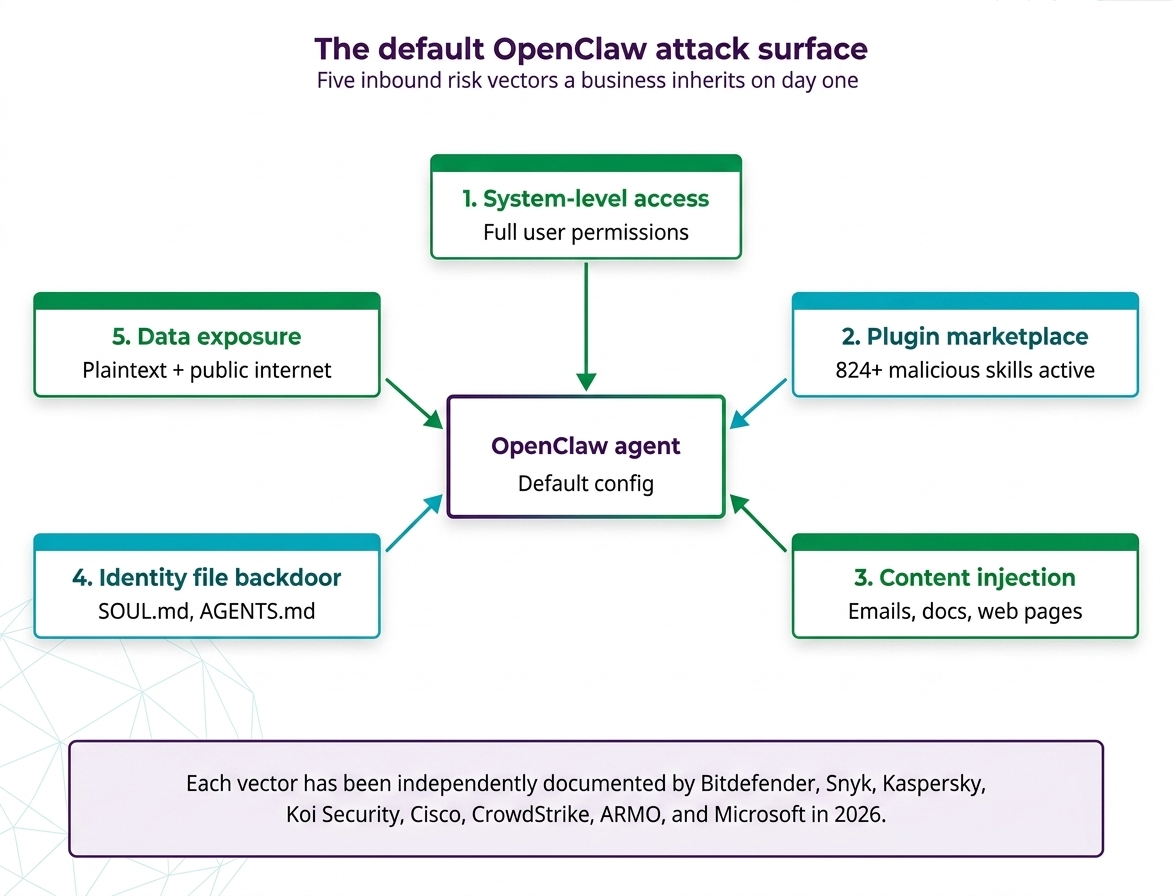
- System-level access — OpenClaw runs with the same permissions as the logged-in user. Full disk, terminal, network.
- A compromised plugin marketplace — Roughly 1 in 8 skills on ClawHub have been flagged malicious. 824+ active as of April 2026.
- Prompt injection via everyday content — Emails, Slack messages, PDFs, and web pages can hijack the agent through hidden instructions.
- Persistent backdoors in identity files — Attackers can modify SOUL.md and AGENTS.md to plant instructions that survive restarts and platform switches.
- Data leaving your environment — Conversations, credentials, and outputs flow to third-party AI providers without enterprise-grade isolation.
These are not theoretical. They have been demonstrated by Bitdefender, Snyk, Kaspersky, Koi Security, Cisco, SecurityScorecard, ARMO, CrowdStrike, and Microsoft’s own Defender team — most of them inside the last 90 days.
What is OpenClaw?
OpenClaw (originally released as Clawdbot, briefly rebranded as Moltbot) is an open-source AI agent framework that lets users connect large language models to their real-world systems. It reads email, executes terminal commands, browses the web, manages files, and operates across chat platforms like Slack, Discord, WhatsApp, and Telegram. Users extend its capabilities by installing “skills” — natural-language plugins hosted on its community marketplace, ClawHub.
It is powerful, genuinely useful, and — in its default configuration — one of the most dangerous pieces of software a company can install on a workstation.
Risk #1: OpenClaw runs with the same access as the user who installs it
When a developer installs OpenClaw on their laptop or a company server, the agent inherits every permission that user has. Files. Credentials. API keys stored in environment variables. SSH keys. Network access to internal systems. Cloud metadata endpoints. Everything.
This is not a bug. It is how the tool is designed to work. That design is what makes OpenClaw useful. It is also what makes a single misconfiguration catastrophic.
Microsoft’s security team was explicit in its February 19, 2026 advisory: OpenClaw should not be deployed on any machine containing sensitive data unless it runs inside a fully isolated environment — a dedicated VM, scoped credentials, continuous monitoring, and a reconstruction plan already in place.
Most teams do none of those things. They install it locally, connect it to their work accounts, and hand it the same credentials their developers use all day.
Why this matters for your business:
Every piece of software your company runs has a blast radius — the area it can damage if it is compromised. With most tools, that radius is narrow. With OpenClaw, the blast radius is the user. If that user is a senior engineer with production access, the blast radius is your production environment.
For a deeper look at how this permission model interacts with the skills ecosystem, see our OpenClaw Skills Development Guide.
Risk #2: The plugin marketplace has been compromised at industrial scale
OpenClaw’s ClawHub marketplace is the second-largest moving part of the platform. Skills are plugins. Users install them. The AI itself can discover and install them mid-conversation, with no human approval by default.
Here is what independent researchers have found on ClawHub since it opened to the public:
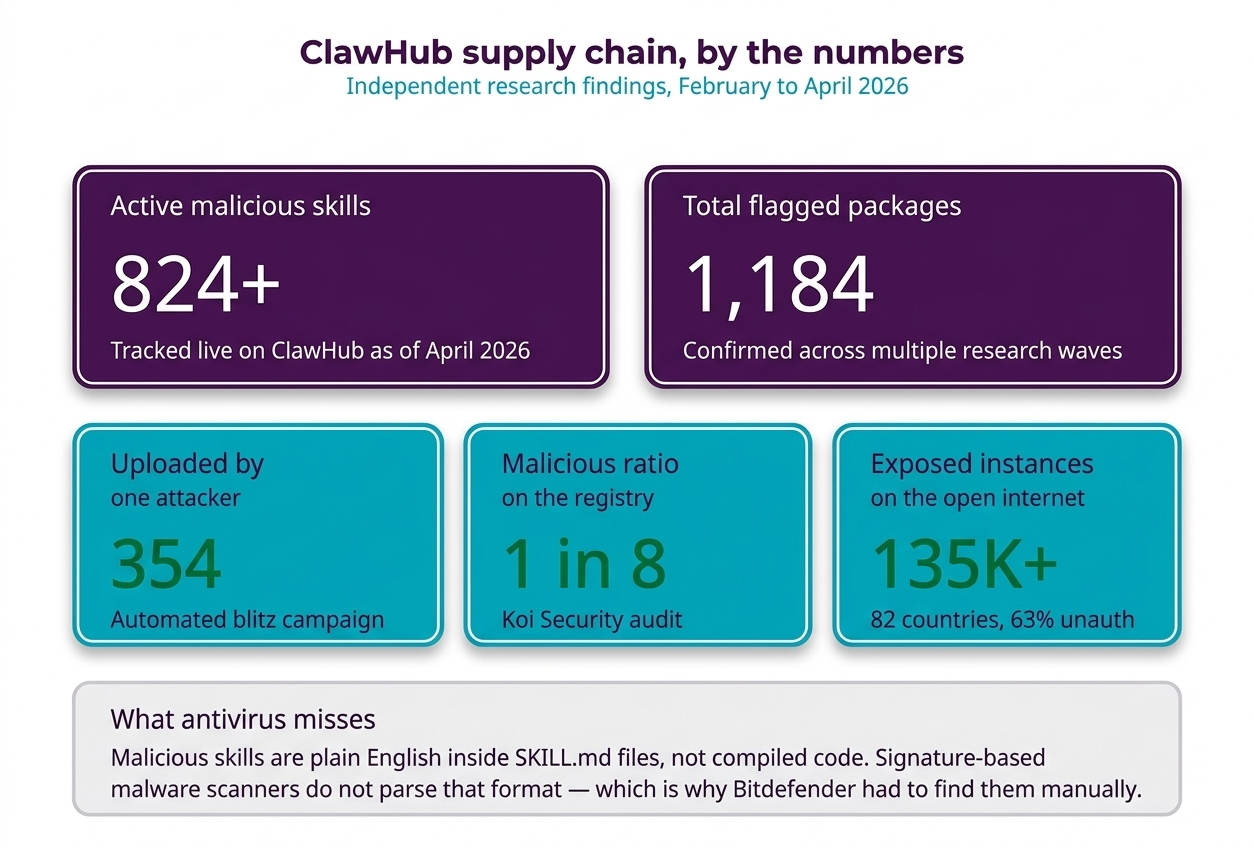
- Bitdefender identified 824+ active malicious skills during the ClawHavoc supply chain campaign.
- Antiy CERT has confirmed over 1,184 malicious packages across multiple waves.
- Koi Security tracked the registry ballooning from 2,857 skills in early February to over 10,700 within two weeks. The malicious ratio hit roughly 1 in 8.
- Snyk found 283 skills leaking credentials in plain text and 76 containing outright malicious payloads.
- A single uploader, “hightower6eu“, published 354 malicious packages in an automated blitz.
- Typosquatting is already in play — the handle “aslaep123” was used to mimic the legitimate developer “asleep123.”
The payloads are not trivial. The ClawHavoc campaign deployed Atomic Stealer on macOS and Vidar on Windows — infostealers that harvest browser cookies, saved passwords, crypto wallets, and Keychain data. Cisco’s AI Defense team documented a popular skill that was functionally malware, silently exfiltrating data through curl commands while using prompt injection to bypass safety checks.
And here is the twist that makes this worse than npm or PyPI: traditional antivirus does not detect most of these threats. OpenClaw skills are natural-language instructions, not compiled code. The malicious payload can sit in plain English inside a SKILL.md file. Signature-based malware scanners do not know what to do with that.
Why this matters for your business:
If your team installs plugins from ClawHub, you have outsourced your security perimeter to unverified contributors. For context on which skills are genuinely safe to use and which to avoid, our Top 10 Popular OpenClaw Skills breakdown pairs utility with security notes.
Risk #3: Anyone who can send you an email can hijack your AI
This is the risk most people fail to internalize. It is also the most dangerous.
OpenClaw’s value comes from reading things. Emails. Documents. Slack threads. PDFs. Web pages. The agent processes this content and acts on it. That is the feature.
The catastrophic problem: the agent cannot reliably tell the difference between a legitimate instruction you gave it and a malicious instruction hidden inside content it is reading.
This attack class is called prompt injection, and it has been demonstrated repeatedly against OpenClaw in live research. A single crafted email has been shown to:
- Silently forward your private messages to an attacker’s inbox
- Delete folders on your file system
- Download and execute malicious code
- Steal API keys and SSH credentials used for server access
- Modify the agent’s own configuration to plant persistent backdoors
Security researcher Simon Willison called this combination the “Lethal Trifecta”: the moment an AI agent has access to private data, can be exposed to untrusted content, and can exfiltrate data externally, it becomes exploitable by anyone who can get a message into any of those channels. OpenClaw activates all three by default.
CrowdStrike classified this as a “full-scale breach enabler” in their 2026 AI threat assessment. That language is not marketing. Their threat analysts are choosing it deliberately.
Why this matters for your business:
Your attack surface is no longer just your network. It is every external system your agent can read from. A phishing email no longer needs to trick a human — it just needs to reach an AI assistant with too many permissions.
We covered the defense architecture in detail in the OpenClaw Prompt Injection Defense Guide. The short version: content filtering, session scoping, and tool allowlists must be in place before the agent processes untrusted input.
Not sure if OpenClaw is the right call for your stack?
Before you commit engineering hours to a deployment — or a migration away from one — get a second opinion from a team that has built managed agentic AI platforms.
Risk #4: Attackers can plant permanent backdoors in the agent’s identity
OpenClaw uses two configuration files that define how the AI behaves: SOUL.md and AGENTS.md. These files are read at the start of every conversation. They define the agent’s personality, rules, and standing instructions.
By default, the agent itself has permission to modify these files.
That is the problem in one sentence.
If an attacker lands a single prompt injection — through an email, a malicious skill, a compromised document — they can instruct the agent to modify its own identity files. Those modifications survive:
- Session restarts
- Chat resets
- Switches between Slack, Telegram, WhatsApp, and the web dashboard
- Reboots of the host machine
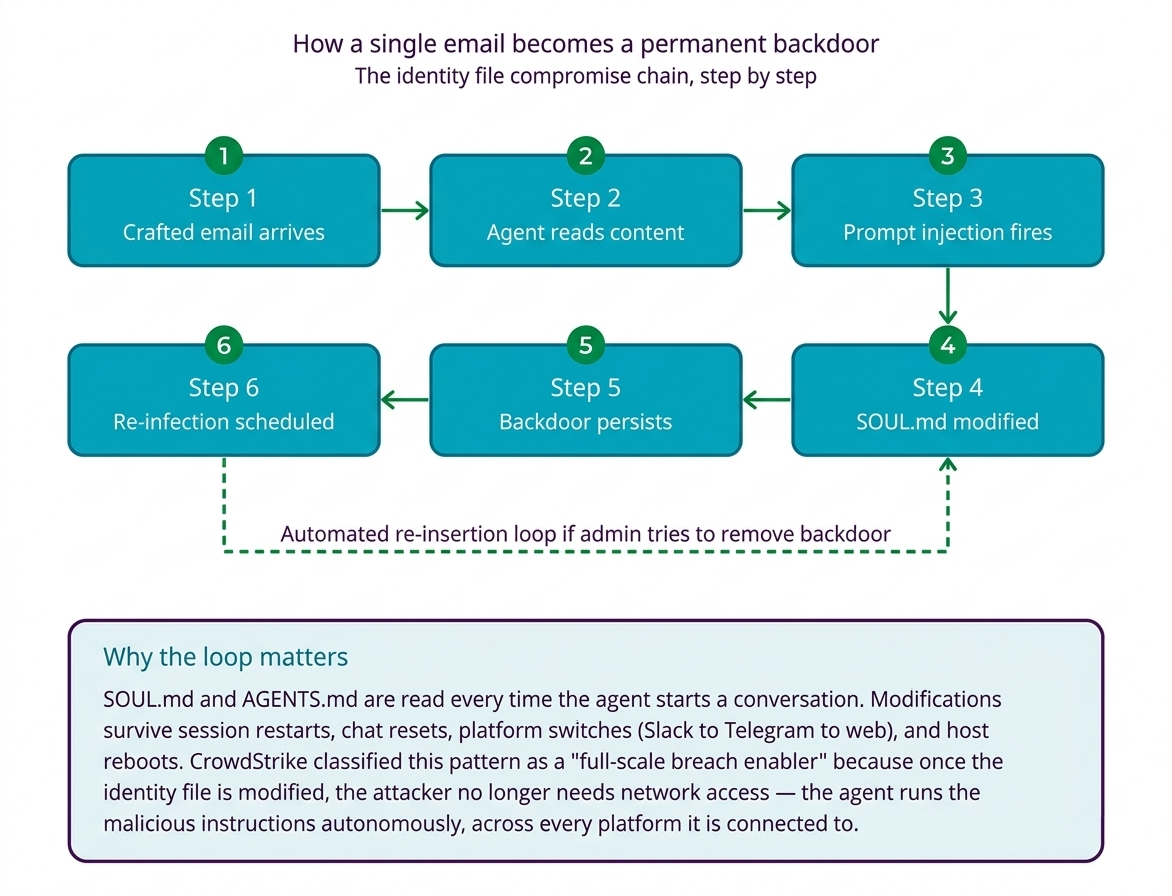
The attack can go further. Researchers have shown it is possible to instruct the agent to set up a scheduled task that re-inserts the malicious content automatically if an administrator tries to remove it. The backdoor becomes self-healing.
CrowdStrike’s threat assessment team classified this as the category that most aggressively expands attacker dwell time — because it does not require ongoing network access. Once the identity file is modified, the attacker does not need to be there anymore. The agent runs the malicious instructions on their behalf, every session, across every platform it is connected to.
Why this matters for your business:
Incident response assumes you can isolate the compromised system and clean it. With identity file compromise, “cleaning” is not straightforward. The agent itself, now operating under the attacker’s instructions, may reinstate the backdoor during recovery.
Risk #5: Sensitive data leaves your environment in ways you cannot control
OpenClaw processes a remarkable volume of sensitive information to do its job. Full conversation logs. Document contents. Command outputs. Browsing history. Credentials it has been handed to authenticate with services.
Two facts about where that data lives by default:
First, most of it sits on the host machine in plain text. Configuration files, API keys, OAuth tokens, and conversation history are stored without encryption. Apiiro’s research found a 40% jump in secrets exposure inside AI-adjacent tooling across Fortune 50 enterprises. Snyk’s audit of ClawHub skills found 7.1% of them exposed credentials in plain text — and that is before counting what OpenClaw itself stores.
Second, all conversation data goes over the public internet to third-party AI providers (Anthropic, OpenAI, or whichever model the agent is configured to use). There is no built-in encrypted tunnel, no enforced data residency, no compliance boundary.
Add the infrastructure exposure problem on top:
- 135,000+ OpenClaw instances have been found exposed on the public internet across 82 countries.
- 63% of those run with no authentication (ARMO Security, March 2026).
- Shodan scans found 42,000+ instances with gateway authentication disabled.
For any business subject to GDPR, HIPAA, SOC 2, or any financial regulator, this is not a configuration nuance. It is an unacceptable default.
Why this matters for your business:
If your AI assistant knows everything your employees know, where that knowledge ends up is a compliance question, not an IT question. Legal, finance, and risk teams will eventually be asked to defend the deployment. Without encryption, isolation, and audit logging in place from day one, there is nothing to defend.
So, is OpenClaw safe for enterprise use?
Short answer: not out of the box. Not on a standard workstation. Not connected to production systems.
A longer answer: OpenClaw can be deployed safely, but doing so requires an engineering investment most teams have not budgeted for. The hardening checklist includes — at minimum — sandboxed execution in isolated containers, a private vetted skill registry, content filtering on all incoming data, read-only identity files with integrity monitoring, encrypted data at rest and in transit, zero-trust network architecture with no public gateway exposure, and continuous monitoring with automated response.
If you cannot confidently check every item on that list, OpenClaw in its raw open-source form is the wrong answer. Either defer the deployment, or work with a team that operates a managed platform with those controls already in place.
What a defensible OpenClaw deployment actually looks like
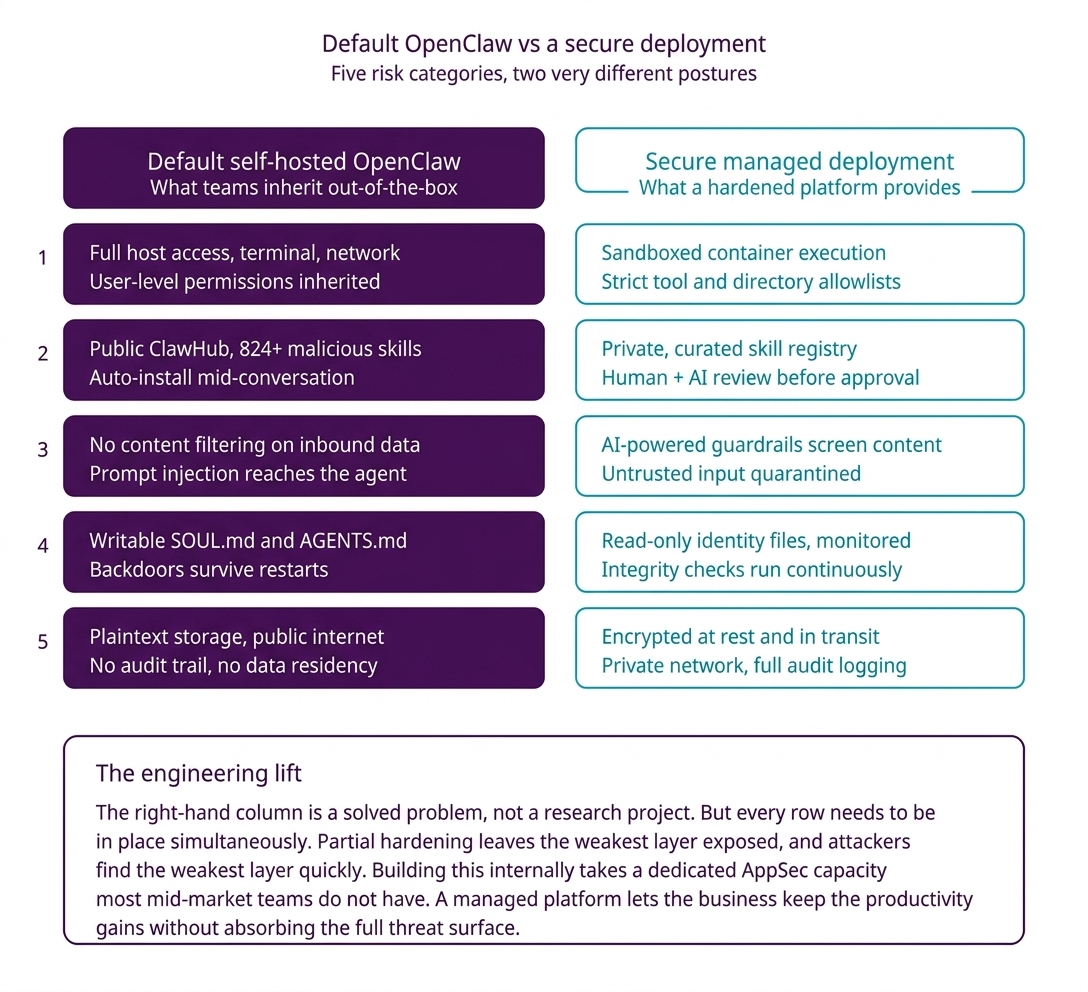
The good news: every risk in this article has a concrete mitigation. None of them are research projects. The bad news: they all need to be in place simultaneously.
A production-grade deployment needs to address each risk at its source:
- Against system-level access: the agent runs inside an isolated container with a strictly scoped allowlist of tools and directories. Nothing more.
- Against the plugin marketplace: a private, curated skill registry replaces ClawHub. Every skill is reviewed — manually by humans and programmatically by content-analysis models — before it enters the registry.
- Against prompt injection: every piece of incoming content passes through an AI-powered guardrail layer (Amazon Bedrock Guardrails, Lakera, or equivalent) that detects hidden instructions before the agent sees them. Untrusted content is processed in a quarantined session with no action permissions.
- Against identity file compromise: SOUL.md and AGENTS.md are mounted read-only. A file integrity monitor alerts on any attempt to modify them. Automated integrity checks run continuously.
- Against data exposure: the agent runs inside a private network that never touches the public internet. All AI traffic stays inside an isolated VPC. Data at rest is encrypted. Credentials are vaulted, not stored. Full audit logs are captured for GDPR, HIPAA, and SOC 2 defensibility.
This is the engineering lift. It is real, but it is also a solved problem for teams that have built this before.
The decision in front of CTOs right now
OpenClaw is not the problem. It is a remarkable piece of engineering and a credible glimpse of where agentic AI is heading. But the gap between “running OpenClaw” and “running OpenClaw safely inside a business” is substantial, and the data from Bitdefender, Microsoft, CrowdStrike, Kaspersky, and ARMO has removed any doubt about that.
The real question for CTOs right now is not whether to explore agentic AI. It is whether to build the security wrapper internally or to partner with a team that has already done the engineering.
Building internally is possible. It requires dedicated AppSec engineering, ongoing CVE tracking (138 disclosed in three months, with 128 still awaiting assignment), compliance infrastructure, and round-the-clock monitoring. For most mid-market and enterprise teams, that is not the highest-leverage use of a stretched security budget.
At GrowExx, we work with CTOs and engineering leaders who want the productivity gains of OpenClaw-class agents without taking on the full security burden themselves. We build managed deployments with sandboxed execution, curated skill registries, content filtering, encrypted private networks, and full audit infrastructure — so your team focuses on the workflows, not the threat surface.
If you are evaluating OpenClaw or already running it and want a second opinion on your security posture, talk to GrowExx’s engineering team about a consultation. We will tell you honestly what we would fix first, what is acceptable, and what a defensible long-term architecture looks like for your stack.
Need to brief your leadership on OpenClaw risk exposure?
GrowExx provides enterprise engineering teams with a board-ready risk assessment.
FAQs for OpenClaw Enterprise Risks
Is OpenClaw safe for business use?
In its default configuration, no. OpenClaw runs with full user-level system permissions, reads content from untrusted sources, and can install plugins from a marketplace where roughly 1 in 8 packages has been flagged malicious. It can be made safe for business use, but that requires sandboxed execution, a private skill registry, content filtering, read-only identity files, encrypted data handling, and continuous monitoring — a stack most teams do not have in place by default.
What is OpenClaw used for?
OpenClaw is an open-source AI agent framework that connects large language models to real-world tools. Users use it to read and respond to emails, manage files, execute terminal commands, coordinate tasks across messaging platforms (Slack, Telegram, WhatsApp, Discord), browse the web, and automate workflows. Capabilities are extended through community-built “skills” hosted on ClawHub.
What is the ClawHavoc campaign?
ClawHavoc is a coordinated supply chain attack on ClawHub, OpenClaw’s plugin marketplace. Attackers published more than 341 malicious skills disguised as productivity tools, language packs, and AI integrations. Payloads included the Atomic Stealer infostealer on macOS and Vidar on Windows, targeting browser credentials, saved passwords, crypto wallets, and Keychain data. As of April 2026, 824+ malicious skills were still tracked as active across the broader ClawHub ecosystem.
Does antivirus detect malicious OpenClaw plugins?
Largely no. OpenClaw skills are written in natural language, not compiled code. Malicious instructions can sit in plain English inside a SKILL.md file. Signature-based malware scanners are not built to parse that format, which is why independent researchers had to uncover the ClawHavoc campaign manually rather than relying on standard endpoint detection.
What is prompt injection, and why does it affect OpenClaw specifically?
Prompt injection is an attack where hidden instructions are embedded inside content that an AI agent processes — emails, documents, web pages, chat messages. The AI cannot reliably distinguish between legitimate user commands and these planted instructions. OpenClaw is particularly exposed because it reads untrusted content, holds sensitive credentials, and can execute system-level actions. That combination is what Simon Willison calls the “Lethal Trifecta,” and it is why prompt injection against OpenClaw has been demonstrated to exfiltrate files, forward messages, and plant persistent backdoors.
How many OpenClaw vulnerabilities have been disclosed?
Between February and April 2026, 138 CVEs have been tracked against OpenClaw — seven rated critical and 49 rated high severity. An additional 128 security advisories are still awaiting CVE assignment. The OpenClaw team has been releasing patches quickly (typically 2 to 13 days after disclosure), but industry research suggests self-hosters take 1 to 4 weeks on average to apply non-critical patches, leaving a meaningful exposure window.
Can we use OpenClaw for regulated workloads (GDPR, HIPAA, SOC 2)?
Not without a purpose-built deployment wrapper. Default OpenClaw stores credentials in plain text, sends conversation data over the public internet, and has no built-in audit logging, data residency controls, or access scoping. A compliance-ready deployment requires encrypted storage, private network isolation, full audit trails, vaulted credentials, and documented incident response procedures — all of which can be built, but none of which ship by default.
What's the difference between OpenClaw and Claude Code?
OpenClaw is an open-source AI agent framework that users self-host and extend through a public community marketplace. Claude Code is a commercial AI coding agent built by Anthropic, with centralized security updates, strict read-only defaults, and enterprise controls like SSO and audit trails. For most business use cases, Claude Code is the safer choice; OpenClaw is better suited for experimentation unless it is deployed behind a full enterprise-grade security wrapper.


Building an agentic AI platform, or partnering with one?
Contact Us Today


